You’ve seen it in movies. A character sweeps a room with a high-tech gadget and finds a bug. Now you’re wondering if the phone in your pocket can do the same for a GPS tracker on your car or in your bag. The short, messy answer is: sometimes, but don’t rely on it as your only line of defense.
I’ve spent years in the digital security space, and the question of consumer-grade detection comes up constantly. Most articles give a simplistic yes or no. The reality is a spectrum of maybe, depending on the tracker’s technology, your phone’s capabilities, and a hefty dose of luck. Let’s cut through the hype and look at what your phone can actually do, where it fails spectacularly, and what you should do instead if you’re genuinely concerned.
What You’ll Learn
How Phones Can "Sense" Trackers (The Technical Basics)
Your smartphone isn't a magic wand. It detects trackers the same way it finds wireless headphones or a public Wi-Fi network: by picking up their radio signals. Most consumer-grade trackers—think the kind sold on Amazon or at big-box stores—use one of three methods to transmit location data:
- Bluetooth Low Energy (BLE): Common in compact tags like Apple AirTag or Tile. They ping nearby Apple devices or phones with the Tile app to relay location.
- Cellular Data (4G/LTE): Used by more advanced, subscription-based trackers. They have a SIM card and transmit directly to a server, like a phone without a screen.
- GPS + Radio Frequency (RF): Often used in older or specialty vehicle trackers. They log GPS data and may broadcast it via a short-range radio signal to a dedicated receiver.
Your phone’s built-in radios (Bluetooth, Wi-Fi, and in some cases, NFC) are the only tools it has to "see" these devices. If a tracker doesn't broadcast a signal your phone can listen for, your phone is blind to it.
The Big Misconception: People assume a phone can detect any electronic device. It can't. It can only detect devices that are actively communicating in a language (protocol) it understands, within a very limited range. A cellular tracker using 4G is talking directly to a cell tower, not your phone. Your phone won't know it's there.
Method 1: The Manual Bluetooth & Wi-Fi Scan
This is the most direct, no-apps-needed method. It works exclusively against trackers that are actively broadcasting a Bluetooth or Wi-Fi signal to pair or be discovered.
Step-by-Step: The Sweep
Go to your phone’s Bluetooth settings. Tap to scan for new devices. Do the same for Wi-Fi networks. Now, walk slowly around your car, your bag, your room. Look for device names that are:
- Generic: "HC-05", "BT-Tracker", "GPS", "Device_XXXX"
- Suspiciously Timed: A strange name that appears only when you're near your car.
- Weak Signal: A device that flickers in and out of the list as you move, indicating it might be hidden.
I tried this on my own car as an experiment. Among the neighbors' speakers and phones, I found a persistent "HC-06" signal strongest near the rear bumper. It turned out to be an old OBD-II dongle I’d forgotten about—a false positive. That’s the problem: you’ll find a lot of junk.
Limitations: A sophisticated tracker won’t broadcast its name openly. It might only transmit data in short, encrypted bursts, invisible to a standard scan. This method is like looking for a specific person in a crowded square by shouting their name. If they don’t want to be found, they won’t answer.
Method 2: Anti-Spyware & Scanner Apps
Apps like "AirGuard" (for Android) or the built-in "Tracker Detect" (on Android) and Apple’s automated alerts for AirTags are a step up. They don’t just scan; they listen for specific, known protocols.
Apple’s system is the gold standard here for one type of tracker. If an AirTag (or compatible device) that’s not registered to you is moving with you over time, your iPhone will eventually send you a precise, unmistakeable alert. Android’s AirGuard does a similar job by constantly monitoring for the unique Bluetooth advertisement packets that AirTags and Tiles emit.
However, these apps are highly specialized. They are excellent for detecting community-based Bluetooth trackers being used for stalking. They are virtually useless against:
| Tracker Type | Will a Scanner App Find It? | Reason |
|---|---|---|
| Apple AirTag / Samsung SmartTag | Yes, this is their specialty. | They fingerprint the exact Bluetooth signal pattern. |
| Cellular (4G/LTE) GPS Tracker | No. | It communicates with cell towers, not your phone's Bluetooth/Wi-Fi. |
| Passive (Data-Logger) Tracker | No. | It stores data internally with no wireless transmission. |
| Custom/Professional Tracker | Highly Unlikely. | Uses proprietary or encrypted signals the app doesn't recognize. |
Many anti-spyware apps in the app store overpromise. They might just run a basic Bluetooth scan and dress it up with a scary interface. Read reviews carefully. The legitimate ones are focused on a specific, common threat (like AirTag stalking), not every tracker imaginable.
The Hard Physical Limitations: When Your Phone is Powerless
This is where the fantasy meets the pavement. Your phone has critical blind spots that no software update can fix.
Range. Bluetooth range is typically 30 feet at best, and that’s through air. A tracker magnetically stuck inside a steel car frame or buried deep in a trunk has its signal attenuated dramatically. You might need to be within inches to detect it.
Transmission Method. As the table shows, cellular trackers are invisible to your phone. They’re the most common type used for long-term vehicle tracking. I once consulted on a case where a business owner found a 4G tracker hardwired into his car’s electrical system. No phone scan would ever have spotted it; it was found during a physical inspection.
Power Cycling. A clever person can install a tracker that only powers on and transmits when the vehicle is moving. Park your car and scan it? The tracker is completely off, silent, and undetectable.
A Non-Consensus View: The biggest mistake I see is over-reliance on the phone. People do a quick Bluetooth scan, see nothing, and assume they’re clean. That’s a dangerous false sense of security. A negative result from a phone app is almost meaningless. It only rules out the dumbest, most obvious Bluetooth trackers.
What to Do Instead: A Real-World Action Plan
If you have a serious concern—like in a contentious divorce, a business dispute, or you’re being stalked—your phone is just the first, weakest step. Here’s a layered approach.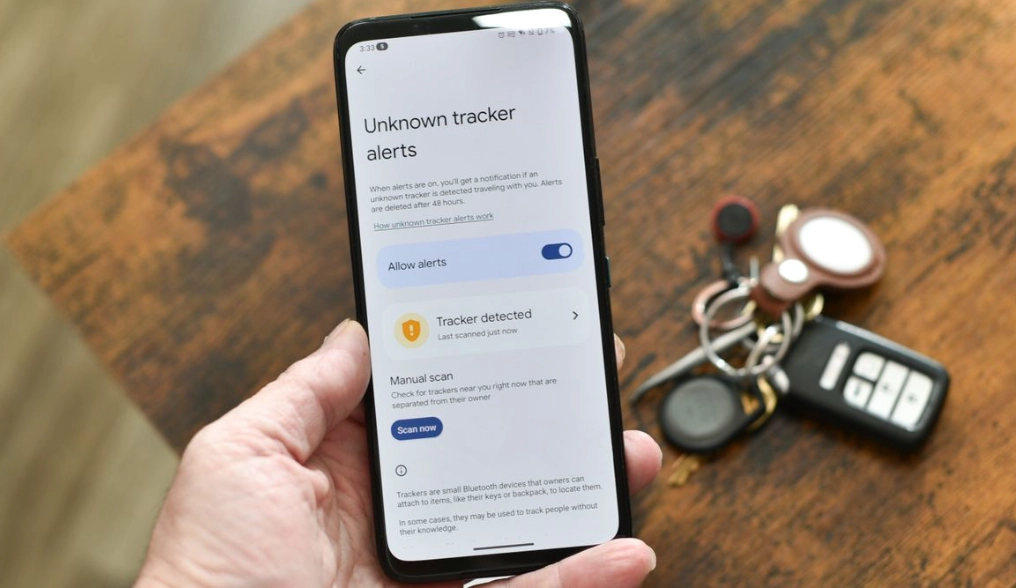
1. The Thorough Physical Inspection
This is 90% of the battle. Trackers need power and a clear view of the sky (for GPS). Check these spots:
- OBD-II Port: Under the dashboard near the steering wheel. The most common, plug-and-play location.
- Under Seats & in Glove Box: Look for small boxes with magnets or wires.
- Wheel Wells & Bumpers: Inside the front and rear bumpers, behind fender liners.
- Under the Vehicle: Use a flashlight. Look for magnetic boxes attached to frame rails.
- Inside Trim Panels & the Trunk: Especially near the spare tire or tail lights.
You’re looking for anything that doesn’t look factory: stray wires, unusual antennas, small black boxes with magnets.
2. Employ a Professional RF Detector
For cellular and active RF trackers, you need a radio frequency (RF) detector. These are handheld devices that sweep a broad range of frequencies, picking up transmissions your phone can’t. Good ones can cost from $150 to over $1000. They’re not foolproof (they can be fooled by other electronics), but in the hands of a knowledgeable user, they are far more effective than any phone.
3. Seek Professional Help
If the stakes are high, hire a licensed private investigator or a TSCM (Technical Surveillance Counter-Measures) specialist. They have the experience and equipment—like spectrum analyzers and non-linear junction detectors—to find even the most hidden devices. It’s expensive, but it’s definitive.
4. Legal and Technical Checks
For a cellular tracker, you can sometimes check for unknown devices on your phone plan’s account page, though this is rare for consumer plans. In severe stalking cases, law enforcement can work with cellular providers to identify suspicious devices pinging near you, but they require substantial evidence to initiate such an investigation.
Your Questions, Answered (Beyond the Basics)
Can a cellular data tracker be detected by an app that scans for signals?
No. This is a critical distinction. Cellular trackers operate on licensed radio bands (like 700 MHz, 1900 MHz) that are strictly for communication between devices and cell towers. Your phone’s user-accessible hardware cannot freely scan these frequencies for other devices; it’s designed to connect to the tower, not eavesdrop on the network. An app claiming to detect 4G trackers is misleading you. As noted by the Federal Communications Commission (FCC), devices must comply with strict rules to avoid interfering with licensed spectrum, which inherently prevents casual scanning.
My phone didn't alert me, but I found a tracker. How is that possible?
Several ways. It could be a cellular tracker, which phones don't detect. It could be a Bluetooth tracker that was programmed not to broadcast a discoverable name. It could be a passive data logger with no signals at all. Or, it could be an AirTag that hasn't been separated from its owner long enough to trigger the anti-stalking protocol (which can take anywhere from 8 to 24 hours). The absence of a phone alert proves nothing.
 Are the "detector" devices sold online for $50 any good?
Most are toys. They’re often just basic Bluetooth scanners in a new case, no better than your phone. A legitimate, wide-band RF detector that can pick up cellular, GPS, and other signals requires sophisticated components and costs significantly more. The cheap ones might find a loudly broadcasting Bluetooth tag, but they’ll miss everything else and likely give false positives from Wi-Fi routers and other electronics.
What's the most common mistake people make when looking for a tracker?
They stop after a 30-second Bluetooth scan. They don't get on their knees and look under the car. They don't check the OBD port. They trust a single, easy technological solution (the phone) over a messy, physical, and time-consuming search. The tracker is a physical object. Finding it often requires getting dirty, not just tapping a screen.
If I get an "Unknown Accessory Detected" alert from my iPhone, what should I do immediately?
First, don't panic, but take it seriously. Tap the alert. Use the "Play Sound" feature to try and locate it. The alert should give you instructions on how to disable the specific tracker (like removing the battery from an AirTag). If you can't find it, consider your recent movements. The alert means a device is traveling with you, not necessarily that one is hidden on your property. It could be in a bag, a coat pocket, or attached to something you're carrying. The next step is a meticulous search of your person and belongings before moving to your vehicle or home.
Reader Comments