You're out birding, and you spot a rare warbler perfectly framed in the morning light. Your binoculars or spotting scope give you a crystal-clear view, but your camera phone is useless at that distance. That's where digiscoping comes in. At its core, digiscoping is the simple act of attaching a smartphone or camera to an optical device—usually a spotting scope—to photograph or video what you see. It turns your scope into a super-telephoto lens. Forget the technical jargon for a minute. If you've ever held your phone up to a telescope eyepiece and tried to snap a blurry picture, you've already attempted the most basic form of it. This guide is about moving from that frustrating fumble to capturing clean, shareable images of distant wildlife.
Your Quick Guide to Digiscoping Success
What Exactly is Digiscoping?
The term is a mashup of "digital" and "scoping." It was coined in the early 2000s when birders started holding compact digital cameras up to their scope eyepieces. Today, it's almost synonymous with using a smartphone. The principle is straightforward: the scope magnifies the subject, and your phone's camera sensor captures that magnified image. You're not taking a picture of the scope's view; you're capturing the view through the scope directly.
Why bother? A professional 800mm camera lens can cost more than a used car. A good spotting scope and a phone adapter combined are a fraction of that price. It's the most accessible path to extreme close-up photography of birds, mammals, or even the moon. The quality won't match a top-tier DSLR with a prime lens, but for documentation, sharing on social media, or personal enjoyment, it's incredibly effective. I remember my first successful digiscoped shot—a somewhat grainy but unmistakable image of a Pileated Woodpecker. The thrill was real, and it cost me nothing but a $30 adapter.
How to Choose the Right Digiscoping Setup
Your setup has three critical parts: the scope, the phone, and the adapter that marries them. Get one part wrong, and the whole system suffers.
The Spotting Scope: The Foundation
You can't build on sand. A shaky, blurry scope gives a shaky, blurry photo. Angled vs. straight eyepieces are a personal choice for viewing, but for digiscoping, angled scopes are often easier to balance on a tripod. Magnification is key. Start with a lower power (like 20-30x). Higher magnifications (60x+) amplify every tiny shake and make finding your subject a nightmare. A larger objective lens (e.g., 80mm) gathers more light, which is crucial in dawn or dusk conditions.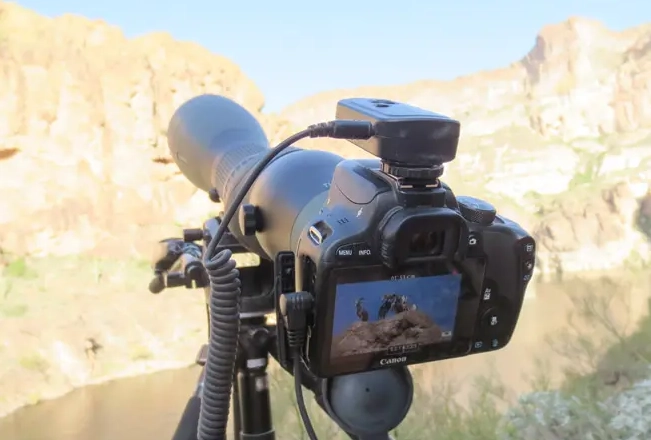
The Smartphone Adapter: The Essential Link
This is where most beginners fail. Hand-holding your phone is a recipe for blur. You need a dedicated adapter. There are two main types:
| Adapter Type | How It Works | Best For | A Key Consideration |
|---|---|---|---|
| Universal Clamp-on | A clamp grips your phone, and an arm positions it over the scope eyepiece. | Beginners, people who share scopes, or use multiple phones. | Ensure the clamp fits your phone's size and case. A loose fit means misalignment. |
| Case-Specific | You screw a dedicated case for your phone model onto the adapter. | Serious users who want the most stable, repeatable alignment. | You're locked into that case. If you upgrade your phone, you need a new case. |
I made the mistake of buying a cheap, flimsy clamp adapter early on. The plastic arm flexed, causing a slight tilt that cut off a corner of every image. Investing in a solid metal one from a brand like Phone Skope or Novagrade was a game-changer.
Your Smartphone Camera
Any modern smartphone works, but you need to understand its limits. The main camera is usually best. Avoid using digital zoom—it just crops the image and kills quality. You're getting all the "zoom" from the scope. The biggest challenge is getting your phone's camera lens to align perfectly with the center of the scope's eyepiece. Even a 2mm off-center alignment will cause vignetting (dark corners).
A non-consensus point on tripods: Everyone says "use a tripod." I'll go further: use a tripod that's heavier than you think you need. A lightweight travel tripod might be fine for viewing, but the moment you touch your phone screen to focus or shoot, it will wobble. For digiscoping, stability isn't a feature; it's the entire foundation. A sturdy tripod with a fluid video head for smooth panning makes a bigger difference than an expensive eyepiece.
The Step-by-Step Digiscoping Process
Let's walk through the actual act of taking a photo. Imagine you've set up your scope on a tripod and spotted a stationary bird.
Step 1: Scope First, Phone Later. Get the bird perfectly in focus using just your eye on the scope. Use the scope's focus wheel to make the details as sharp as possible. This is the most important step. If it's not sharp in the scope, it won't be sharp on your phone.
Step 2: Attach and Align. Mount your phone in the adapter. Loosen the adjustment knobs on the adapter and center your phone's camera lens over the scope's eyepiece. Look at your phone screen. You should see a circular image. Adjust the phone's position until the circle is centered and the dark vignetting around the edges is even on all sides. Then tighten the knobs just enough to hold it. Overtightening can stress the plastic.
Step 3: Camera App Settings. Open your native camera app. Tap on the bird on the screen to set focus and exposure. Often, you'll need to manually drag the exposure slider down. The bright sky behind a bird can trick your phone's meter, making the bird a dark silhouette. Lower the exposure until the bird's details are visible.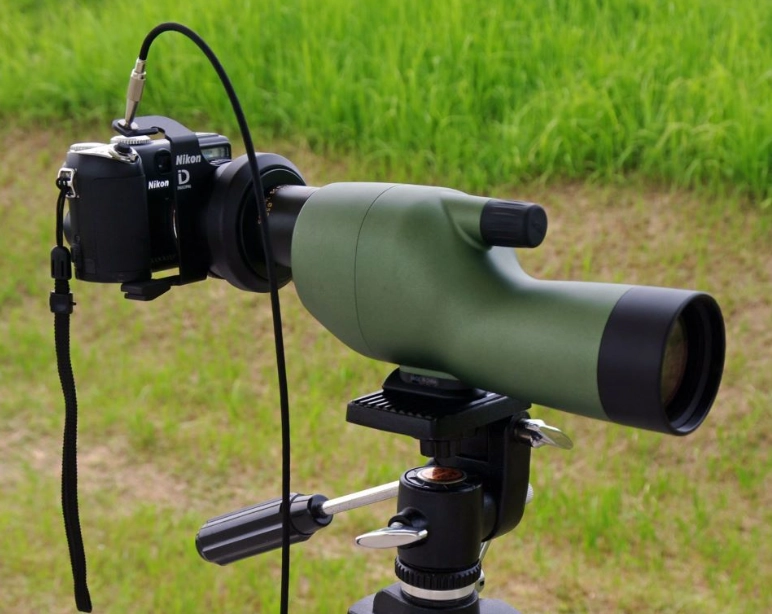
Step 4: The Shooting Technique. Here's a subtle trick no one talks about: Use your phone's volume buttons as the shutter or set a 2-3 second timer. This prevents you from jabbing the screen and shaking the whole setup. If your phone supports it, shoot in RAW or the highest resolution JPEG. Breathe out gently and press the button.
Step 5: Review and Refine. Zoom in on your captured image on the phone screen. Is it critically sharp? If not, go back to Step 1. Often, a tiny tweak of the scope's focus wheel is needed after the phone is attached because the camera sensor sees things slightly differently than your eye.
Pro Tips and Common Mistakes to Avoid
Good light is everything. A bright, overcast day is a digiscoper's best friend—soft light, no harsh shadows. Shooting at high noon on a sunny day creates contrast that smartphone sensors struggle with.
Get close. Well, as close as you safely can. Every meter of distance adds atmospheric haze and reduces detail. The best digiscoping shots often come from a blind or patient stalking, not from the parking lot.
A common mistake is chasing magnification. You see an eagle across the lake and crank the scope to 60x. The image is dim, shaky, and the field of view is so narrow the eagle flies out of it instantly. Start at low power to find and frame your subject, then increase magnification only if the atmosphere is very steady and your tripod is rock solid.
Clean your optics. A speck of dust on the eyepiece that you don't notice with your eye will look like a giant blurry blob in your photo. Keep a lens pen in your bag.
Finally, manage your expectations. Your photos will have noise in low light. They might not be tack-sharp at the pixel level. But they will show details and behaviors of wildlife you could never capture otherwise. That's the magic.
Reader Comments